
Kia Carens: AVN System / AVN Head Unit Components and components location
Kia Carens RP (2013-2018) Service Manual / Body Electrical System / AVN System / AVN Head Unit Components and components location
| Components |
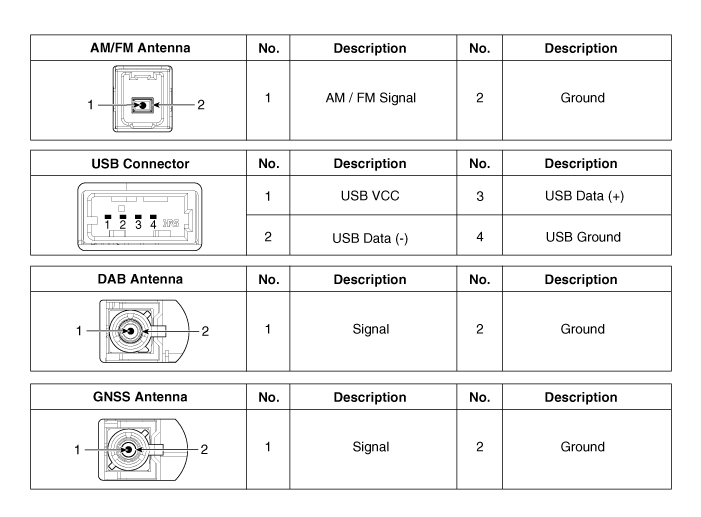
| [LG 7 inch / Internal amplifier (A Type)] |
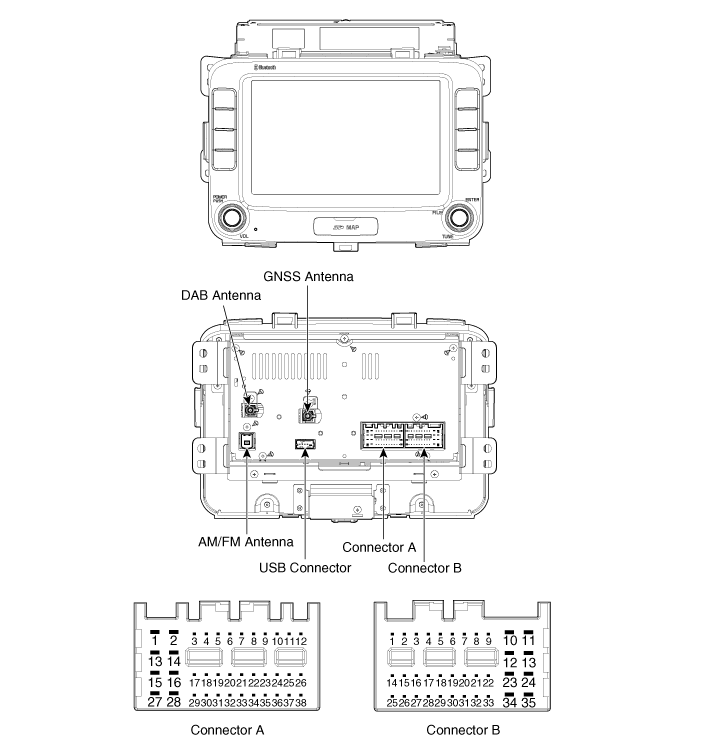
Connector Pin Information
|
No. |
Connector A |
Connector B |
|
1 |
Rear left speaker (+) |
- |
|
2 |
Rear left speaker (-) |
MIC (+) |
|
3 |
- |
- |
|
4 |
- |
- |
|
5 |
- |
Antenna power |
|
6 |
Camera power |
Illumination (+) |
|
7 |
Camera video |
Multmedia-CAN (High) |
|
8 |
- |
- |
|
9 |
- |
- |
|
10 |
AUX Audio right input |
Battery (+) |
|
11 |
AUX Detect |
Battery (+) |
|
12 |
Steering wheel remote controller |
Ground |
|
13 |
Front left speaker (+) |
Ground |
|
14 |
Front left speaker (-) |
- |
|
15 |
Front right speaker (-) |
MIC (-) |
|
16 |
Front right speaker (+) |
- |
|
17 |
- |
- |
|
18 |
- |
- |
|
19 |
- |
Illumination (-) |
|
20 |
Camera power ground |
Multmedia-CAN (Low) |
|
21 |
Camera video ground |
- |
|
22 |
- |
ACC |
|
23 |
- |
- |
|
24 |
AUX Audio left input |
- |
|
25 |
AUX Audio ground |
- |
|
26 |
Steering wheel remote controller Ground |
Door open |
|
27 |
Rear right speaker (-) |
Door unlock |
|
28 |
Rear right speaker (+) |
- |
|
29 |
- |
- |
|
30 |
- |
- |
|
31 |
- |
- |
|
32 |
- |
- |
|
33 |
Camera shield ground |
IGN1 |
|
34 |
- |
- |
|
35 |
- |
- |
|
36 |
- |
|
|
37 |
- |
|
|
38 |
Vehicle speed |
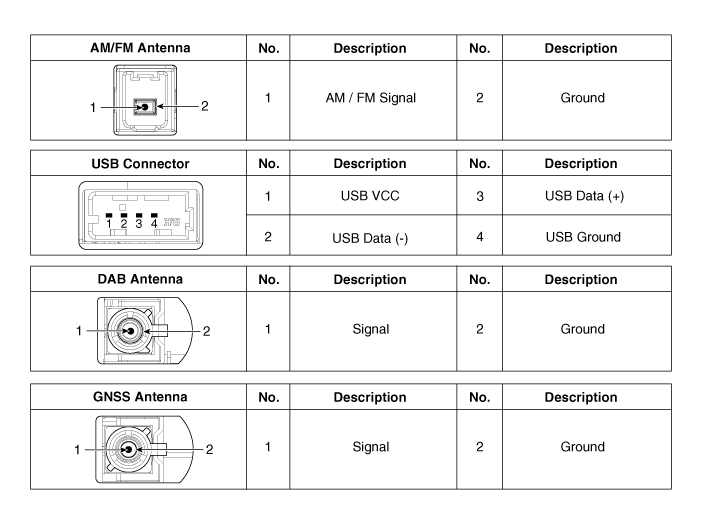
| [LG 8 inch / External amplifier (B Type)] |
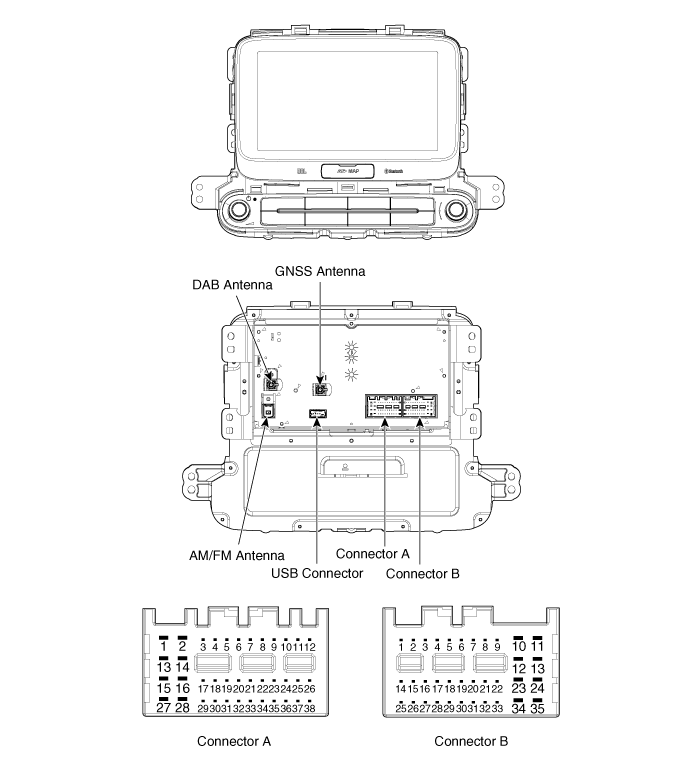
Connector Pin Information
|
No. |
Connector A |
Connector B |
|
1 |
- |
- |
|
2 |
- |
MIC (+) |
|
3 |
Amplifier navigation voice (+) |
- |
|
4 |
Amplifier SPDIF (+) |
- |
|
5 |
- |
Antenna power |
|
6 |
Camera power |
Illumination (+) |
|
7 |
Camera video |
Multmedia-CAN (High) |
|
8 |
- |
- |
|
9 |
- |
- |
|
10 |
AUX Audio right input |
Battery (+) |
|
11 |
AUX Detect |
Battery (+) |
|
12 |
Steering wheel remote controller |
Ground |
|
13 |
- |
Ground |
|
14 |
- |
- |
|
15 |
- |
MIC (-) |
|
16 |
- |
- |
|
17 |
Amplifier navigation voice (-) |
- |
|
18 |
Amplifier SPDIF (-) |
- |
|
19 |
Amplifier SPDIF (Ground) |
Illumination (-) |
|
20 |
Camera power ground |
Multmedia-CAN (Low) |
|
21 |
Camera video ground |
- |
|
22 |
- |
ACC |
|
23 |
- |
- |
|
24 |
AUX Audio left input |
- |
|
25 |
AUX Audio ground |
- |
|
26 |
Steering wheel remote controller Ground |
Door open |
|
27 |
- |
Door unlock |
|
28 |
- |
- |
|
29 |
- |
- |
|
30 |
- |
- |
|
31 |
- |
- |
|
32 |
- |
- |
|
33 |
Camera shield ground |
IGN1 |
|
34 |
- |
- |
|
35 |
- |
- |
|
36 |
- |
|
|
37 |
- |
|
|
38 |
Vehicle speed |
 Troubleshooting
Troubleshooting Guide
Before Thinking The Product Has Malfunctioned
1.
Errors which occur during the operation or installation of the device
may be mistaken a ...
 AVN Head Unit Repair procedures
Removal
•
Take care not to scratch the center fascia panel and related
parts. ...
Other information:
Kia Carens RP (2013-2018) Service Manual: Repair procedures
Removal 1. Remove the transaxle assembly. (Refer to Manual Transaxle System - " Manual Transaxle") 2. Remove the concentric slave cylinder assembly (B) from the manual transaxle after removing bolts (A). ...
Kia Carens RP (2013-2018) Owners Manual: To set cruise control speed
1.Press the cruise button on the steering wheel, to turn the system on. The cruise indicator light will illuminate. 2.Accelerate to the desired speed, which must be more than approximately 30 km/h (20 mph). ✽ NOTICE - Manual transaxle For manual transaxle vehicles, you should depress the brake ...
Copyright © www.kicaman.com 2015-2026
