
Kia Carens: Clutch Release Fork and Clutch Release Bearing / Repair procedures
Kia Carens RP (2013-2018) Service Manual / Clutch System / Clutch Release Fork and Clutch Release Bearing / Repair procedures
| Removal |
| 1. |
Remove the transaxle assembly.
G 1.6 GDI (Refer to Manual Transaxle System - " Manual Transaxle")
G 2.0 GDI (Refer to Manual Transaxle System - " Manual Transaxle")
G 2.0 MPI (Refer to Manual Transaxle System - " Manual Transaxle")
D 1.7 LP (Refer to Manual Transaxle System - " Manual Transaxle")
|
| 2. |
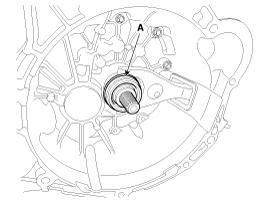
Remove the clutch release bearing (A).
|
| 3. |
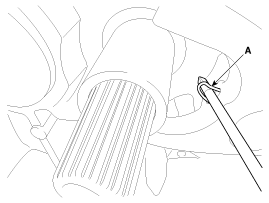
Pull the clip (A).
|
| 4. |
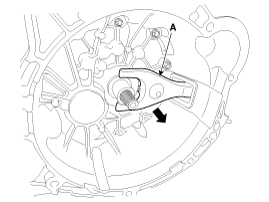
Remove the clutch release fork (A).
|
| 5. |
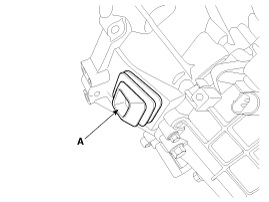
Remove the boot (A).
|
| Inspection |
| 1. |
Check for damage to boot.
|
| 2. |
Check for deformation to clutch release fork.
|
| 3. |
Check for deformation to clutch release bearing.
|
| Installation |
| 1. |
Install the boot (A).
|
| 2. |
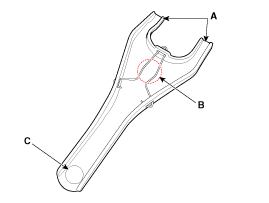
Install the clip to the clutch release fork.
|
| 3. |
Apply to grease in location A, B and C.
|
| 4. |
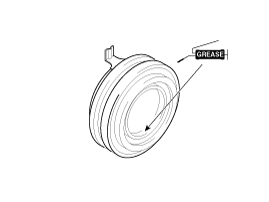
Apply the grease to the hole surface of the clutch release bearing all
around.
|
| 5. |
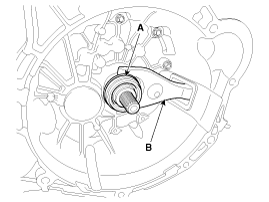
Install the clutch release fork (B), clutch release bearing (A).
|
| 6. |
Install the transaxle assembly.
G 1.6 GDI (Refer to Manual Transaxle System - " Manual Transaxle")
G 2.0 GDI (Refer to Manual Transaxle System - " Manual Transaxle")
G 2.0 MPI (Refer to Manual Transaxle System - " Manual Transaxle")
D 1.7 LP (Refer to Manual Transaxle System - " Manual Transaxle")
|
 Components and components location
Components
1. Clutch release fork
2. Clutch cover assembly
3. Clutch disk assembly
4. Clutch release bearing
...

Other information:
Kia Carens RP (2013-2018) Owners Manual: Front seat adjustment - manual
Forward and backward To move the seat forward or backward: 1. Pull the seat slide adjustment lever up and hold it. 2. Slide the seat to the position you desire. 3. Release the lever and make sure the seat is locked in place. Adjust the seat before driving, and make sure the seat is locked securely ...
Kia Carens RP (2013-2018) Owners Manual: Heated steering wheel
With the ignition switch in the ON position, pressing the heated steering wheel button warms the steering wheel. ✽ NOTICE The heated steering wheel will turn off automatically approximately 30 minutes after the heated steering wheel is turned on. If you turn on the ignition again after turn ...
Copyright © www.kicaman.com 2015-2026
