Kia Carens: Crash Pad / Steering Column Shroud Panel Repair procedures
[Steering column shroud lower panel]
| • |
Put on gloves to protect your hands.
|
|
| • |
When prying with a flat-tip screwdriver, wrap it with protective
tape, and apply protective tape around the related parts, to
prevent damage.
|
| • |
Use a plastic panel removal tool to remove interior trim pieces
to protect from marring the surface.
|
| • |
Take care not to bend or scratch the trim and panels.
|
|
| 1. |
Remove the crash pad lower panel.
(Refer to Crash Pad - "Crash Pad Lower Panel")
|
| 2. |
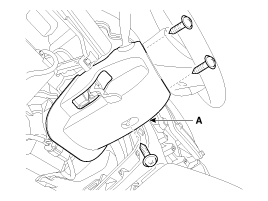
After loosening the mounting screws, then remove the steering column
shroud lower panel (A).
|
| 3. |
Install in the reverse order of removal.
| •
|
Replace any damaged clips.
|
|
|
[Steering column shroud upper panel]
| • |
Put on gloves to protect your hands.
|
|
| • |
When prying with a flat-tip screwdriver, wrap it with protective
tape, and apply protective tape around the related parts, to
prevent damage.
|
| • |
Use a plastic panel removal tool to remove interior trim pieces
to protect from marring the surface.
|
| • |
Take care not to bend or scratch the trim and panels.
|
|
| 1. |
Remove the cluster fascia panel.
(Refer to Crash Pad - "Cluster Fascia Panel")
|
| 2. |
Install in the reverse order of removal.
| •
|
Replace any damaged clips.
|
|
|
Component Location
1. Steering column shroud lower
panel
2. Steering column shroud upper
panel
...
Component Location
[LH]
1. Crash pad side cover [LH]
[RH]
1. Crash pad side cover [RH]
...
Other information:
Precautions
General Precautions
Please read the following precautions carefully before performing the airbag
system service.
Observe the instructions described in this manual, or the airbags could accidentally
deploy and cause damage or injuries.
• ...
The rearview camera will activate when the back-up light is ON with the ignition
switch ON and the shift lever in the R (Reverse) position.
This system is a supplemental system that shows behind the vehicle through the
navigation monitor or audio display while backing-up.
WARNING
This system is ...



 Steering Column Shroud Panel Components and components location
 Crash Pad Side Cover Components and components location