
Kia Carens: Ignition Switch Assembly / Repair procedures
Kia Carens RP (2013-2018) Service Manual / Body Electrical System / Ignition Switch Assembly / Repair procedures
| Inspection |
| 1. |
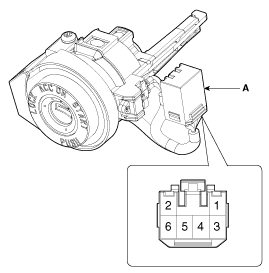
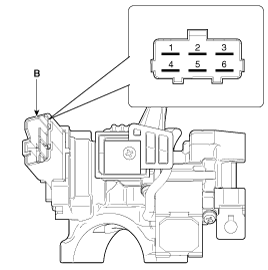
Disconnect the ignition switch connector (B) and key warning switch
connector (A) from under the steering column.
|
| 2. |
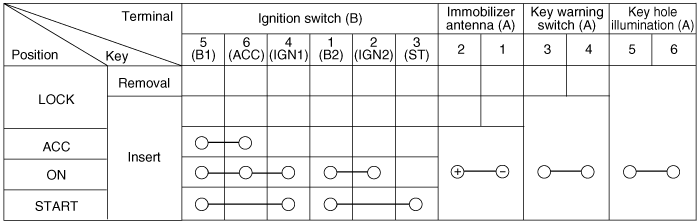
Check for continuity between the terminals.
|
| 3. |
If continuity is not specified, replace the switch.
|
| Removal |
| 1. |
Disconnect the negative (-) battery terminal.
|
| 2. |
Remove the crash pad lower panel.
(Refer to Body - "Crash Pad Lower Panel")
|
| 3. |
Remove the steering column upper and lower shrouds.
(Refer to Body - "Steering Column Shroud Panel")
|
| 4. |
Remove the wiper switch.
(Refer to "Multifunction switch")
|
| 5. |
Remove the ignition switch after disconnecting the ignition switch 6P
connector.
|
| 6. |
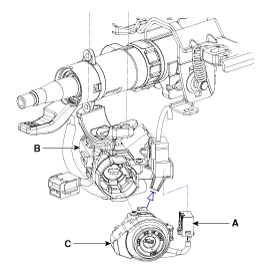
Remove the key warning/immobilizer connector (A).
|
| 7. |
After loosening the screw, remove the key warning switch and key Illumination
(B).
|
| 8. |
If it is necessary to remove the key lock cylinder (C), after turning
the key to ACC, remove the key lock cylinder while pushing the removal/
installation button under the key cylinder.
|
| Installation |
| 1. |
Install the key lock cylinder.
|
| 2. |
Install the key warning and immobilizer connector.
|
| 3. |
Install the ignition switch.
|
| 4. |
Install the steering column shrouds and crash pad lower panel.
|


Other information:
Kia Carens RP (2013-2018) Service Manual: Description and operation
Warning Lamp Activation Warning Lamp Behavior after Ignition On As soon as the operating voltage is applied to the SRSCM ignition input, the SRSCM activates the warning lamp for a LED lamp check. The lamp shall turn on for 6 seconds during the initialization ...
Kia Carens RP (2013-2018) Service Manual: Front Stabilizer Bar Repair procedures
Replacement 1. Loosen the wheel nuts slightly. Raise the vehicle, and make sure it is securely supported. 2. Remove the front wheel and tire (A) from front hub. Tightening torque: 88.2 ~ ...
Copyright © www.kicaman.com 2015-2026
