
Kia Carens: Automatic Transaxle Control System / Output Speed Sensor Repair procedures
Kia Carens RP (2013-2018) Service Manual / Automatic Transaxle System / Automatic Transaxle Control System / Output Speed Sensor Repair procedures
| Inspection |
| 1. |
Turn ignition switch OFF.
|
| 2. |
Remove the air cleaner assembly.
(Refer to Engine Mechanical System - "Air cleaner")
|
| 3. |
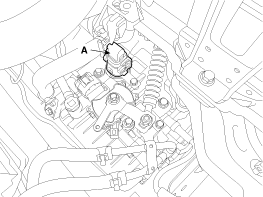
Disconnect the solenoid valve connector (A).
|
| 4. |
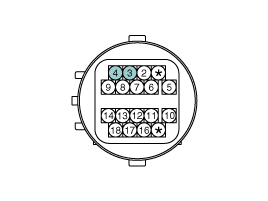
Measure the resistance between power terminal (3) and signal terminal
(4).
|
|
Specification : Approx. 0.88 MΩ
|
| Removal |
| 1. |
Remove the valve body assembly.
(Refer to Hydraulic System - "Valve Body")
|
| 2. |
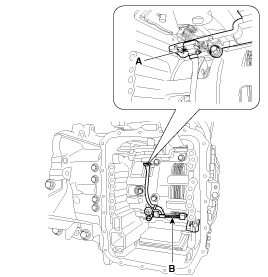
Disconnect the input & output speed sensor connector (A).
|
| 3. |
Remove the input & output speed sensor (B) after loosening the bolts.
|
| Installation |
| 1. |
Install in the reverse order of removal.
|

 Output Speed Sensor Troubleshooting
Signal Waveform
Fig 1) Input/Output speed sensor at low speed
Fig 2) Input/Output speed sensor at high speed ...
 Torque Converter Control Solenoid Valve (T/CON_VFS) Specifications
Specification
Item
Specification
Control type
N/L (Normal Low)
Control pressure kpa (kgf/cm², psi)
...
Other information:
Kia Carens RP (2013-2018) Service Manual: Troubleshooting
Troubleshooting Customer Complaint Analysis Check Sheet There are six areas where a problem can occur: wiring harness, the radio, the CD player, and speaker. Troubleshooting enables you to confine the problem to a particular area. Chart 1 ...
Kia Carens RP (2013-2018) Service Manual: Front Seat Cushion Cover Components and components location
Component Location 1. Front seat cushion cover ...
Copyright © www.kicaman.com 2015-2026
