
Kia Carens: Fuel Delivery System / Fuel Tank Repair procedures
Kia Carens RP (2013-2018) Service Manual / Engine Control / Fuel System / Fuel Delivery System / Fuel Tank Repair procedures
| Removal |
| 1. |
Release the residual pressure in fuel line. (Refer to Delivery System
- “Release Residual Pressure in Fuel Line”)
|
| 2. |
Remove the rear seat cushion. (Refer to Body - "Rear Seat Assembly")
|
| 3. |
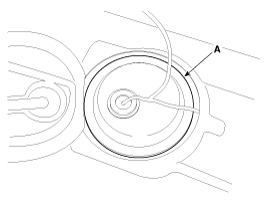
Remove the fuel pump service cover (A).
|
| 4. |
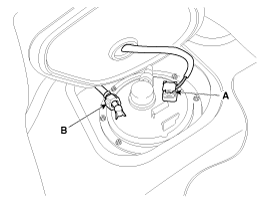
Disconnect the fuel pump connector (A).
|
| 5. |
Disconnect the fuel feed tube quick connector (B).
|
| 6. |
Lift the vehicle and support the fuel tank with a jack.
|
| 7. |
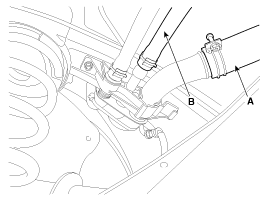
Disconnect the fuel filler hose (A) and the leveling hose (B).
|
| 8. |
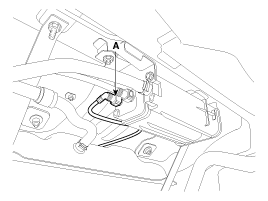
Disconnect the vapor tube quick-connector (A).
|
| 9. |
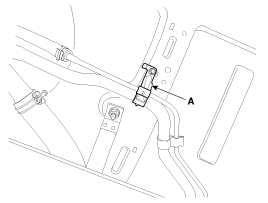
Remove the vapor tube & leveling hose bracket (A) after loosening the
mounting bolt.
|
| 10. |
Remove the parking brake line. (NON-EPB Type only)
|
| 11. |
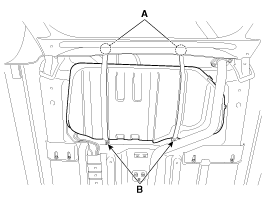
Remove the fuel tank installation nuts (A) and bolts (B).
|
| 12. |
Remove the fuel tank from the vehicle after removing the fuel tank band.
|

| Installation |
| 1. |
Install in the reverse order of removal.
|
 Repair procedures
Fuel Pressure Test (Low
pressure system)
1.
Release the residual pressure in fuel line. (Refer to Fuel Delivery
System - “Release Residual Pressure in Fuel ...
 Fuel Pump Repair procedures
Inspection
[Fuel pump]
1.
Turn ignition switch OFF and disconnect the negative (-)battery cable.
2.
Remove the fuel pump assembl ...
Other information:
Kia Carens RP (2013-2018) Service Manual: Yaw-rate and G Sensor Repair procedures
Removal 1. Turn ignition switch OFF and disconnect the negative (-) battery cable. 2. Pull the passenger seat towards the front till the end. 3. Disconnect the yaw rate & lateral G sensor connector ...
Kia Carens RP (2013-2018) Service Manual: Repair procedures
Inspection Front Door Lock Module Inspection 1. Remove the front door trim. (Refer to Body - "Front Door Trim") 2. Remove the front door module. (Refer to Body - "Front Door Module") ...
Copyright © www.kicaman.com 2015-2026
